Custom AI insights
AI Job Closeout Workflows for Service Businesses: Collect Proof, Sign-Offs, and Final Details Before Billing
AI can assemble job evidence, check closeout requirements, and prepare an invoice-ready packet. The best workflow keeps workmanship, customer disputes, scope changes, and billing approval with people.
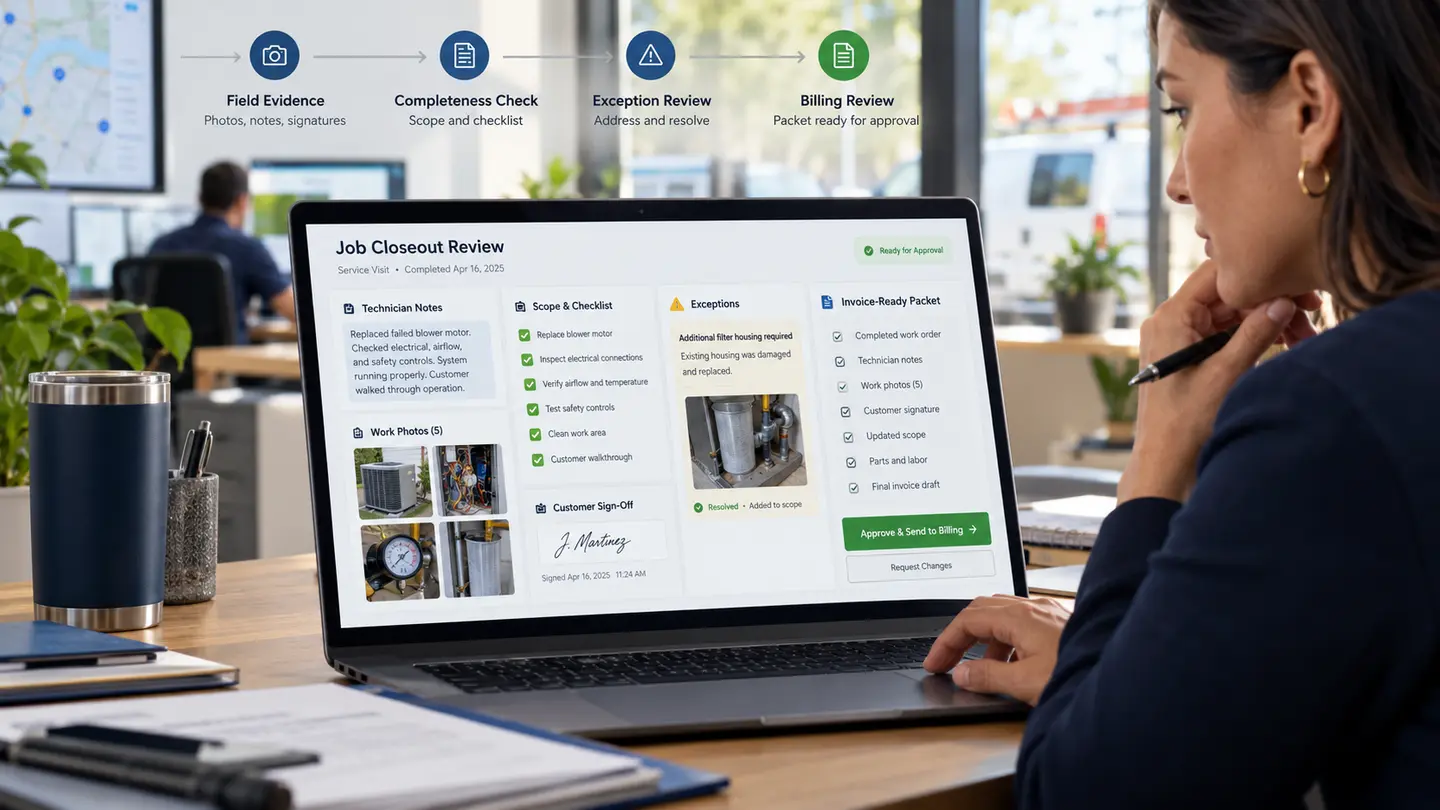
Finishing the work is not always the same as closing the job.
A technician may complete the repair, installation, inspection, or project while the office is still waiting for photos, equipment details, customer sign-off, material notes, warranty information, a final time entry, or confirmation that approved changes were included. Billing slows down, customers receive incomplete records, and the next employee has to reconstruct what happened.
AI can help organize job closeout by reading the evidence already produced, checking it against a defined closeout checklist, and routing missing or unusual items to the right person. It should not certify that work was completed correctly, invent proof, or decide that a customer’s concern can be ignored.
Job Closeout Is a Workflow, Not a Button
A “complete” status in field-service software often hides several separate decisions. Was the approved scope performed? Were required photos attached? Did the customer acknowledge completion? Were serial numbers or readings recorded? Are change orders approved? Is the final amount ready for invoicing?
Different job types need different evidence. A maintenance visit may need readings and recommendations. An installation may need startup results, model and serial numbers, warranty details, and a signed acceptance. A project may need a punch-list status and final deliverables.
The first design step is to define what closeout means for each narrow category of work.
Build a Closeout Packet From Existing Evidence
A useful system can gather technician notes, time entries, photos, forms, customer messages, parts used, approvals, and prior job details into one reviewable packet. AI can summarize unstructured notes and label evidence, while fixed rules verify that required fields and attachments are present.
The packet should link back to the originals. A clean summary is helpful, but the office, supervisor, or customer should be able to inspect the source photo, signed form, or approved change rather than trusting a generated sentence.
Check Requirements Without Pretending to Inspect the Work
AI can compare the packet with a job-type checklist: required before-and-after photos, safety form, equipment identifiers, customer sign-off, final measurements, disposal record, permit status, or another business-defined requirement.
That is an administrative completeness check, not a professional inspection. A model cannot determine from limited notes that workmanship is safe, code-compliant, or contractually complete. Qualified people remain responsible for those judgments.
The system should say what is present, what appears missing, and what needs human review. It should not convert uncertainty into a green checkmark.
Resolve Missing Details While the Job Is Still Fresh
Closeout gaps become expensive when discovered days later. The technician may not remember which part was installed. The customer may be harder to reach. A missing photo may require a return visit.
A closeout assistant can check the packet when the technician submits the job and send a focused request: “The installation checklist requires the serial number and startup reading; neither appears in the submitted form.” That is more useful than a generic rejection.
Notifications should go to a named owner and stop when the requirement is satisfied. Repeated alerts without ownership create noise, not control.
Keep Customer Sign-Off Meaningful
Customer acknowledgment may confirm access, receipt of information, or acceptance of completed work. It should not be treated as a trick to erase unresolved concerns.
If a customer notes damage, incomplete work, a disputed charge, or a requested correction, the workflow should route the job to a person. AI can organize the issue and prepare the history, but a supervisor or account owner should decide the response.
Use clear language about what the customer is signing and preserve the signed record with the version they saw.
Reconcile Closeout With Scope and Change Orders
Before billing, the closeout packet should be compared with the approved estimate, work order, and any change orders. The goal is to find mismatches: work noted but not approved, approved work not documented, quantities that changed, or final details that affect the invoice.
AI can highlight possible discrepancies. It should not set the final price, approve an unrecorded scope change, or quietly rewrite the agreement. Money and customer commitments need visible human control.
Prepare Billing Without Automatically Releasing It
Once the required evidence is present, the system can prepare an invoice-ready summary: customer and job identifiers, approved scope, completed items, approved changes, billable quantities, tax or payment references from the system of record, and supporting documents.
A person can then review the exceptions and release billing. Routine, proven job types may eventually need less manual review, but disputed work, unusual pricing, missing approvals, or high-value invoices should stay behind an approval gate.
Send the Customer a Useful Completion Record
Closeout is also a customer experience. The final package might include a plain-English work summary, care instructions, warranty information, photos, recommended next steps, and contact details for questions.
AI can draft this from approved facts. It should not add unapproved recommendations, promise coverage, or hide technician warnings. The public-facing record needs the same source discipline as the internal packet.
Measure Whether Closeout Improves Cash Flow and Quality
Useful measures include time from field completion to invoice readiness, percentage of jobs returned for missing evidence, days to collect sign-off, billing corrections, disputed invoices tied to documentation gaps, and repeat visits caused by missing records.
Do not celebrate faster invoices if missing evidence or disputes increase. The goal is a cleaner handoff from completed work to documented work, customer communication, and billing.
Start With One Job Type
Choose a frequent job with a known closeout checklist and a painful documentation gap. Map the evidence, owners, exceptions, and approval points. Run the workflow in review mode before allowing it to change statuses or prepare customer records automatically.
Once the process produces reliable packets, expand to another job type. A narrow closeout system that people trust is more valuable than a universal checklist that fits nothing well.
Want a Cleaner Path From Completed Work to Billing?
Custom AI By Design can help map your closeout requirements, connect the evidence your team already produces, and build a reviewable workflow that reduces missing details without removing the people responsible for quality, customer decisions, and billing.
Close Jobs With the Evidence Your Office Needs
We can help you map the closeout checklist, connect notes and proof from the field, and build a human-controlled path from completed work to customer records and billing.
Discuss a Custom Build ↗