Custom AI insights
Can Custom AI Work With the Software You Already Use?
Custom AI can often work with the software your business already uses. The important questions are how it connects, what it can change, and how failures stay visible.
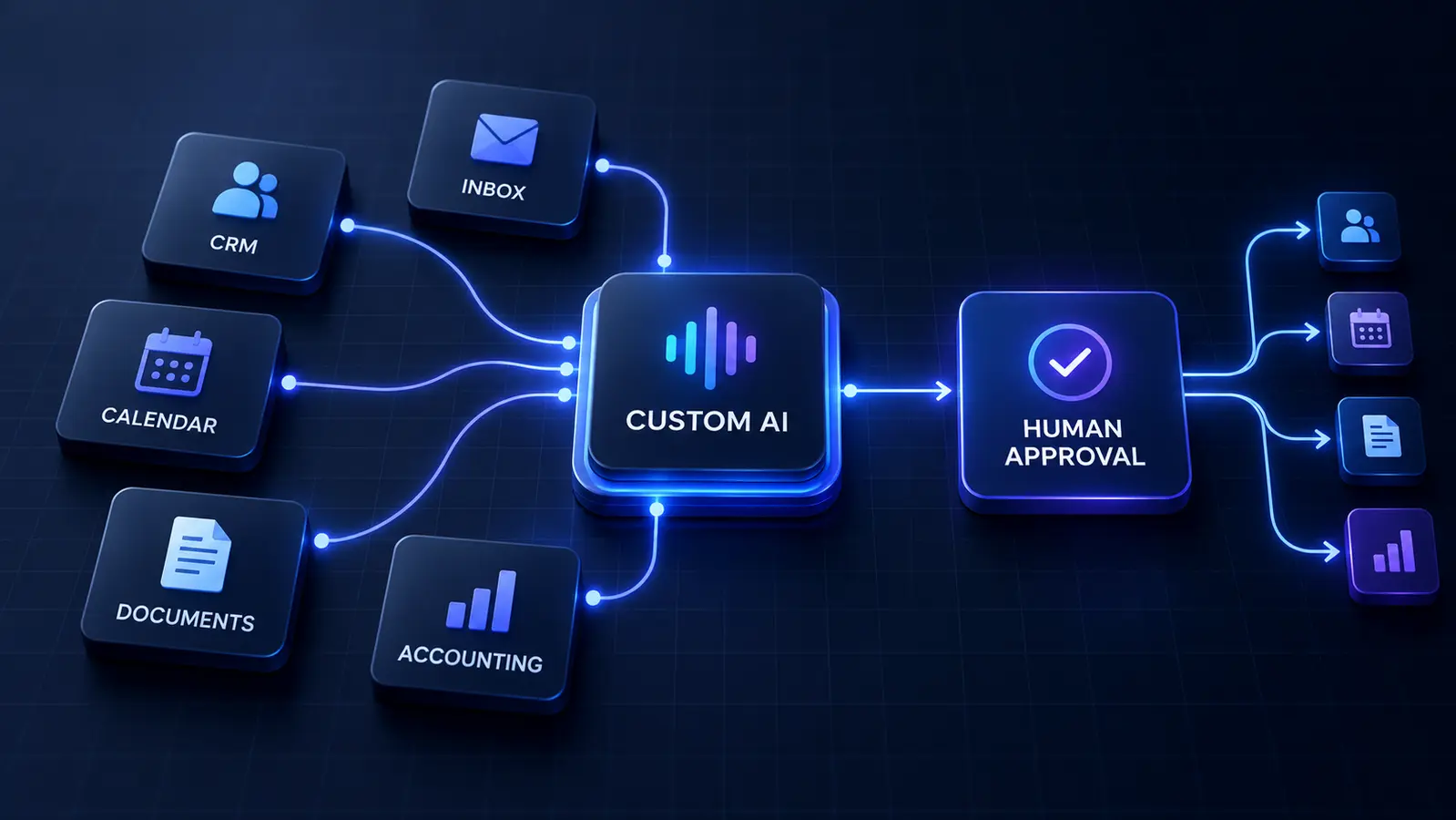
A custom AI system is most useful when it fits into the way your business already works. That usually means it needs to use information from the software you already rely on: your CRM, inbox, calendar, document storage, help desk, accounting platform, scheduling system, or project-management tools.
The short answer is yes, custom AI can often work with existing software. The more useful answer is that the quality of the result depends on how those systems can be connected, what the AI is allowed to read or change, and how failures are handled.
A good integration does not simply give an AI model access to everything. It gives a narrowly defined workflow the minimum access it needs, keeps important records in their proper system, and makes consequential actions visible to a person.
Integration Is More Than “Connecting an API”
An API is a structured way for software systems to exchange information. Many business tools provide one, and that can make an integration cleaner. But an available API does not automatically create a reliable workflow. The project still has to define which records matter, how fields match, when information should move, and what happens when a request is incomplete or rejected.
Some tools offer webhooks that notify another system when an event occurs. Others support scheduled exports, email forwarding, shared folders, or automation connectors. A few have no practical integration method at all. The right design begins with the real capabilities of each tool, not a promise that every application can be connected in the same way.
Keep the System of Record in Charge
Every important category of information should have a clear home. The CRM may own the customer record. The calendar may own availability. The accounting platform may own invoice status. The knowledge base may own approved policies and service information.
AI can read, summarize, classify, or prepare updates, but it should not quietly become a competing database. When the same fact is stored in several places, people stop knowing which version is current. A well-designed workflow retrieves the authoritative value when it is needed and sends approved changes back to the system that owns it.
Choose the Safest Connection Method That Works
Direct API access is often the strongest option because it can be documented, permissioned, and monitored. Established automation connectors may also work well for common systems and predictable actions. File imports or scheduled exports can be appropriate when real-time access is unnecessary.
Browser automation—software that clicks and types through a website—can sometimes bridge a tool with no usable API, but it is usually more fragile. A changed button, login screen, or page layout can break the workflow. It should be treated as a last practical option with monitoring and a clear fallback, not as an invisible permanent connection.
Separate Reading From Writing
There is a meaningful difference between letting a system read a customer record and letting it change that record. There is an even bigger difference between drafting an invoice note and sending an invoice, or checking availability and confirming an appointment.
Start with read access or draft-only actions when possible. If the workflow proves reliable, allow narrowly defined writes such as adding a note, creating a review task, or updating a specific field. Pricing changes, refunds, account closures, financial commitments, and sensitive customer decisions should normally require explicit human approval.
As the architecture grows, separate tool permissions across agents only when the boundary is useful.
Map Identity, Fields, and Business Rules
Integrations fail when two systems use different meanings for similar information. One tool may identify a customer by email address, another by account number, and another by a free-text company name. A “closed” status might mean completed in one system and cancelled in another.
Before building, map the important fields, identifiers, statuses, and ownership rules. Decide how duplicates are detected and how conflicts are resolved. The AI can help interpret messy language, but stable rules should control predictable record matching and high-impact changes.
Design for Missing Data and Broken Connections
Real business systems occasionally time out, reject an update, change a permission, or return incomplete information. A reliable custom AI workflow assumes those failures will happen. It should show that an action did not complete, preserve the original request, and tell the right person what needs attention.
Retries need limits so the system does not create duplicate appointments, tasks, or messages. Logs should show which source was used, what action was attempted, and whether it succeeded. A human fallback matters most when the customer believes something has already been confirmed.
Ask Better Questions Before an Integration Project
Before approving a build, ask which systems will be connected, whether their current plans include the required access, and which one will remain the source of truth. Ask exactly what the AI can read, create, update, or send. Ask how credentials are stored, how permissions are limited, and how access can be revoked.
Also ask what happens when a connection fails, how duplicate actions are prevented, and who will maintain the integration if a software provider changes its API. These questions turn “it integrates” from a sales phrase into an understandable operating design.
For each connection, decide who controls each integration account and credential.
Make Your Current Software More Useful
A custom AI system should not force you to replace good software just to claim that the project is modern. Often, the most valuable result is a useful layer between the tools you already own: gathering context, preparing work, routing exceptions, and reducing repeated copying without weakening control.
If your staff spends time moving the same information between systems, Custom AI By Design can help map the workflow, examine the available connection methods, and design a focused integration around the tools and approval points that already matter to your business.
Connect the Workflow, Not Just the Apps
Tell us which tools your team uses and where information still has to be copied, checked, or routed manually. We can help determine what can connect cleanly and where human approval should remain.
Discuss Your Workflow ↗